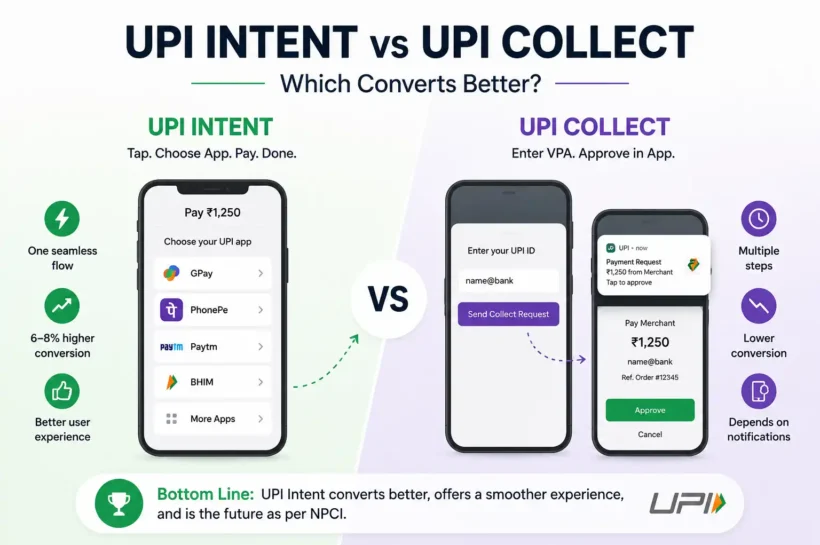

UPI Intent vs UPI Collect: Which Converts Better?
If you are designing a UPI checkout, the single biggest decision you will make is between UPI Intent and UPI Collect. The two flows look similar on the surface but behave very differently in terms of user experience, success rates, and where NPCI is pushing the ecosystem.
Here is the honest comparison.
What is UPI Collect
In a collect flow, the user types or pastes their VPA (UPI ID) on your checkout page. Your payment gateway sends a collect request to the user’s UPI app. The user gets a push notification, opens it, approves the payment with their UPI PIN, and the transaction completes.
Collect was the original UPI flow for ecommerce. It works on any device because it does not need the UPI app to be on the same phone as the checkout, which makes it useful for desktop browser flows in particular.
What is a UPI Intent
In an intent flow, the user taps a Pay with UPI button on your checkout. The device fires a UPI intent and shows the user a list of installed UPI apps (GPay, PhonePe, Paytm, BHIM, CRED, Navi, etc.). The user picks one, the app opens with the payment details pre-filled, the user authorises with their UPI PIN, and the result returns to the merchant.
Intent only works when the user is on a mobile device with at least one UPI app installed, which today is over 95 percent of Indian smartphone users.
Success rate comparison
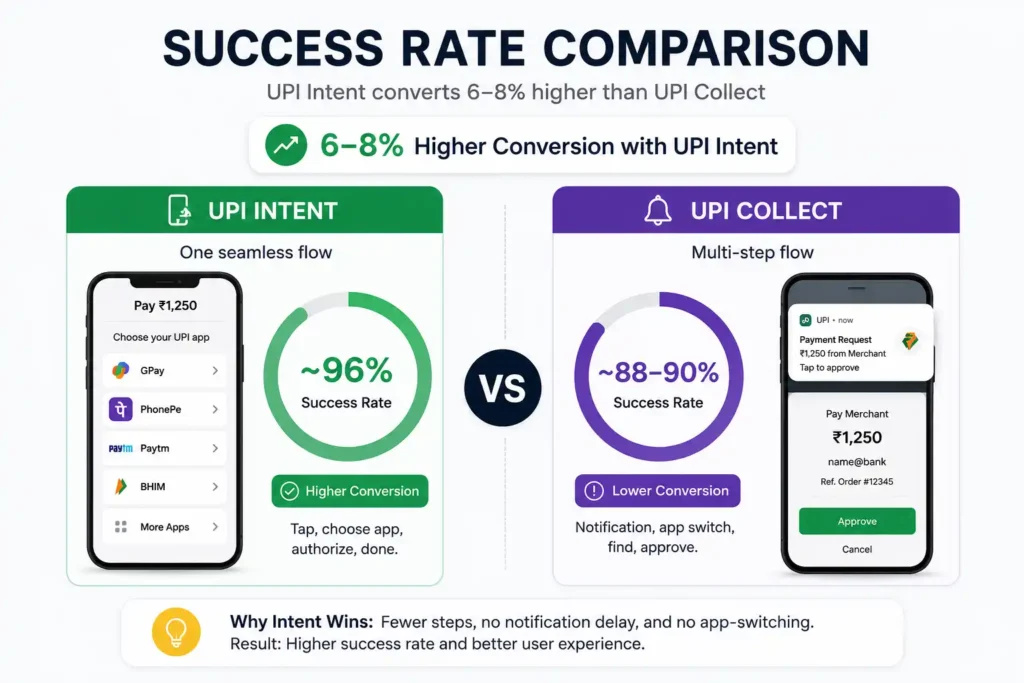
The industry data is consistent across multiple payment gateways: UPI Intent converts 6 to 8 percent higher than UPI Collect on the same merchant base.
Why?
Collect requires the user to switch apps manually. They are checking out, then a notification arrives, they have to remember to open it, find it in the notification tray, swipe through, and approve. Drop-off happens at every one of those micro-steps. If the notification is delayed by even 5 to 10 seconds, users abandon.
Intent is one continuous flow. Tap, pick app, authorise, return. The UPI app is opened automatically. No notification anxiety, no app-switching loop.
When intent wins
- Mobile app or mobile web checkouts
- Quick-commerce and food delivery
- D2C ecommerce on Shopify and similar platforms
- Anywhere the user is already on their phone
For these flows, intent should be the default and collect should not even be presented as an option.
When collect still has a place
- Desktop browser checkouts where the user does not want to scan a QR
- B2B invoicing where the user is on a laptop and pays from a phone they own
- Specific MCC categories where intent is restricted (rare)
Even here, dynamic QR is usually a better second choice than collect, because it lets the user scan from any UPI app instantly.
💚 You Might Also Like: 10 Market Conditions That Influence Listings and IPO Success
NPCI’s direction
NPCI has been clear about the future. UPI Collect for P2M (person-to-merchant) transactions is being phased out. Specific MCC codes already have collect blocked:
- MCC 5413 (credit card bill payments) and MCC 5412 (digital gold): collect blocked, intent and QR allowed
- MCC 6513 (real estate rentals), MCC 6540 (wallet top-up), MCC 5816 (digital gaming): collect and QR blocked, only intent allowed
The direction is unambiguous: intent for mobile, QR for desktop. New integrations should not lead with collect.
Practical UX recommendations
If you have a mobile checkout:
- Default to UPI Intent with the device’s installed apps surfaced clearly
- Show the top 3 to 4 UPI apps as branded buttons (GPay, PhonePe, Paytm, BHIM) with a More option
- Offer a dynamic UPI QR code as a secondary fallback for users on tablets or unusual devices
- Do not show collect as a default option
If you have a desktop checkout:
- Lead with dynamic QR (scan from any UPI app)
- Offer collect only as a tertiary fallback, framed as enter your UPI ID
- Show estimated wait time so the user knows to check their notification tray
The TPAP nuance
On Android, you can auto-fetch the list of installed UPI apps (TPAPs) and show them natively in your checkout. This makes the intent flow even smoother because the user picks an app inside your branded UI rather than going through a system chooser. On iOS, the equivalent has to be done inside your gateway SDK.
💚 You Might Also Like: Why Your ERP Success Depends on Choosing the Right Oracle NetSuite Partner
Bottom line
Intent converts better. Intent is where NPCI is taking the ecosystem. And intent is what your customers prefer once they have used it. If you are integrating UPI today, default to intent on mobile, dynamic QR on desktop, and treat collect as a legacy fallback only.
The 6 to 8 percent conversion lift is real and compounds. On a million-rupee monthly UPI run-rate, that is 60,000 to 80,000 rupees of extra revenue every month, just from switching to the right flow.
🧠 Feed your curiosity with Tech Statar.