

What are Email Management Tools? Why are they crucial?
Email management tools are software solutions designed to help users organize, prioritize, and automate their email workflows efficiently. Unlike basic email clients, these tools offer advanced features such as filtering, automation, and collaboration capabilities. Their main purpose is to reduce inbox clutter and improve productivity by ensuring important emails are not missed. According to industry insights, professionals spend nearly 28% of their workweek managing emails, making these tools essential. By combining organization with automation, email management tools streamline communication and enable users to focus on more meaningful and high-value tasks daily.
Email management tools play a critical role in improving productivity and reducing digital stress. Studies show that employees check their email every six minutes on average, which disrupts focus and efficiency. These tools help save time by automating repetitive tasks and organizing incoming messages effectively. They also reduce inbox clutter, making it easier to find important conversations. For teams, they enhance collaboration through shared inboxes and task assignments. Improved response times also lead to better customer communication. Overall, email management tools empower users to work smarter, maintain organization, and achieve higher efficiency in daily operations.
Main Features Needed in Email Management Tools
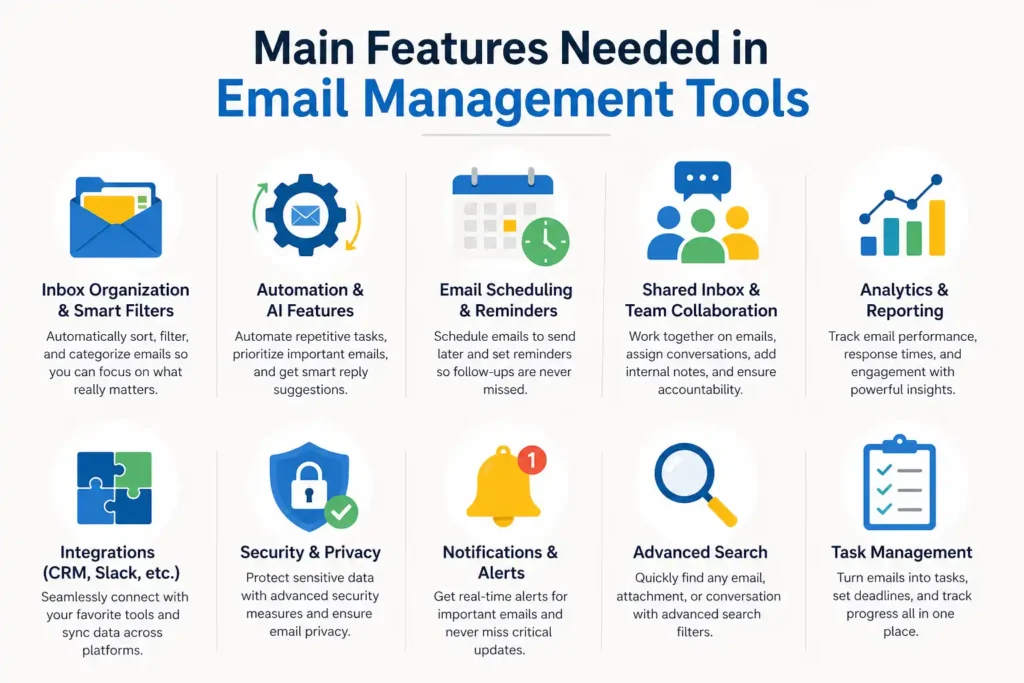
Choosing the right email management tool depends on understanding the features that truly impact productivity. Modern tools go beyond simple email sorting and offer intelligent systems to streamline workflows. Features like automation, analytics, and integrations are essential for maximizing efficiency. Research shows that automation alone can reduce workload by up to 30%. Businesses should prioritize tools that align with their needs, whether it’s team collaboration or customer communication. A well-rounded tool not only organizes emails but also enhances decision-making and communication processes through data insights and seamless integrations with other productivity platforms.
Inbox Organization & Smart Filters
Inbox organization features help users categorize emails efficiently using labels, folders, and rules. Smart filters automatically sort incoming messages based on priority, sender, or keywords. This reduces manual effort and ensures important emails are easily accessible. By keeping the inbox structured, users can focus on essential tasks without being overwhelmed by unnecessary or low-priority messages.
Automation & AI Features
Automation and AI features streamline repetitive email tasks, such as sorting messages and sending responses. AI can prioritize emails based on importance and even suggest replies. This reduces manual workload and increases efficiency. With automation, users can focus on high-value tasks while the system handles routine communication processes in the background effectively.
Email Scheduling & Reminders
Email scheduling allows users to send messages at optimal times, improving engagement and response rates. Reminder features ensure that follow-ups are not missed, which is crucial for business communication. These tools help maintain consistency in communication and prevent delays, making them especially valuable for professionals managing multiple conversations daily.
Shared Inbox & Team Collaboration
Shared inboxes enable teams to manage emails collectively, ensuring transparency and accountability. Team members can assign conversations, leave internal notes, and track responses. It also improves customer service by ensuring that no email is overlooked and responses are handled efficiently.
Analytics & Reporting
Analytics and reporting features provide insights into email performance, such as response times and engagement rates. These metrics help businesses identify areas for improvement. Data-driven insights allow teams to optimize communication strategies, improve efficiency, and ensure better outcomes in both internal and external email interactions.
Integrations (CRM, Slack, etc.)
Integrations allow email management tools to connect with other platforms like CRM systems and team communication apps. This creates a seamless workflow where data is synchronized across tools. By integrating systems, users can manage customer interactions, track conversations, and collaborate without switching between multiple applications.
Types of Email Management Tools
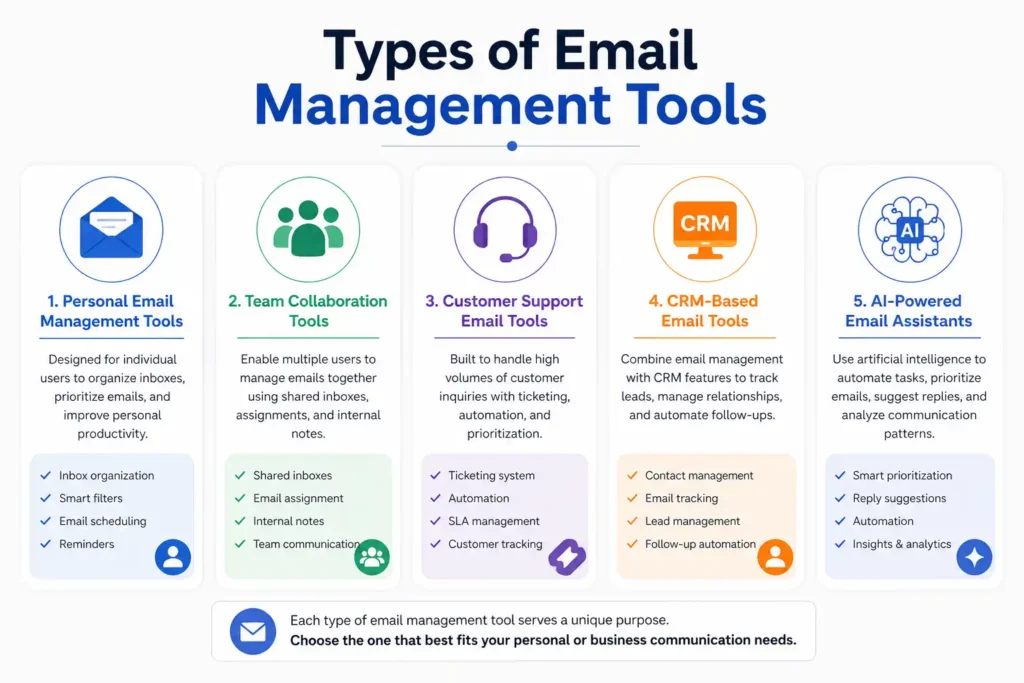
Email management tools come in different types, each designed for specific use cases. Understanding these categories helps users choose the right solution based on their needs. Some tools focus on personal productivity, while others are built for team collaboration or customer support. Research indicates that businesses using specialized tools experience better efficiency compared to generic solutions. Categorizing tools also highlights their strengths, whether it’s automation, communication, or data management. By selecting the appropriate type, users can maximize benefits and ensure their email workflows are aligned with their goals and operational requirements effectively.
Personal Email Management Tools
Personal email management tools are designed for individual users who want to organize their inbox and improve productivity. These tools focus on features like filtering, scheduling, and prioritization. They help reduce clutter and ensure important emails are not missed, making them ideal for freelancers, professionals, and everyday users.
Team Collaboration Tools
Team collaboration tools enable multiple users to manage emails together through shared inboxes and task assignments. These tools are particularly useful for businesses where multiple team members handle customer queries or internal communication processes.
Customer Support Email Tools
Customer support email tools are built to manage high volumes of customer inquiries. They often include ticketing systems and automation features. These tools ensure that customer emails are tracked, assigned, and resolved efficiently, improving response times and overall customer satisfaction significantly.
CRM-Based Email Tools
CRM-based email tools combine email management with customer relationship management. They allow businesses to track interactions, manage leads, and automate follow-ups. This integration helps improve sales processes and customer engagement by keeping all communication and data in one centralized system.
AI-Powered Email Assistants
AI-powered email assistants use machine learning to automate and optimize email workflows. They can prioritize messages, suggest replies, and analyze communication patterns. These tools enhance productivity by reducing manual effort and providing intelligent insights that improve overall email management efficiency.
Best Email Management Tools (Detailed List)
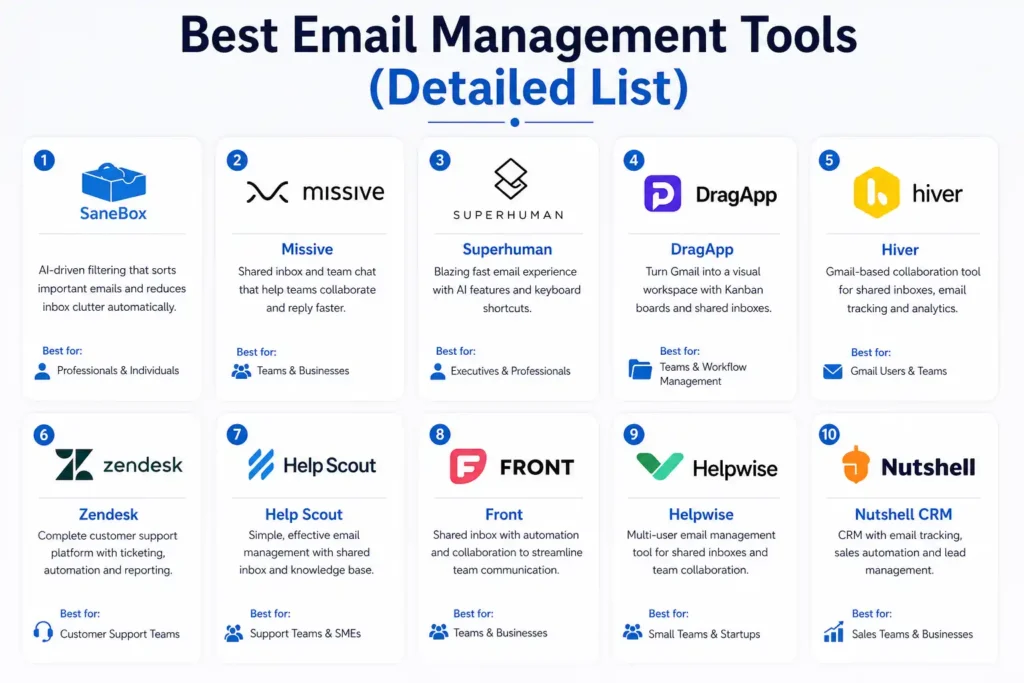
There are many email management tools available, each offering unique features and benefits. Selecting the best tool depends on factors like business size, workflow needs, and budget. Industry comparisons show that tools with automation and collaboration features tend to perform better in productivity improvements. This section highlights some of the top tools based on usability, features, and performance. Each tool has been selected after analyzing competitor content and market trends. Whether you need a simple solution for personal use or a robust platform for team collaboration, these tools offer reliable options to enhance email management.
1. SaneBox
SaneBox is a powerful email management tool known for its AI-driven filtering system. It automatically sorts important emails into priority folders, reducing inbox clutter. The tool also offers features like reminders and unsubscribe options. It is best suited for professionals who want a simple yet effective way to manage their emails.
2. Missive
Missive is designed for team collaboration, offering a shared inbox and real-time chat features. It supports multiple communication channels, making it versatile for businesses. Teams can assign emails and collaborate on responses. It is ideal for organizations that need efficient communication and teamwork within a single platform.
3. Superhuman
Superhuman focuses on speed and productivity, offering a fast email experience with keyboard shortcuts and AI features. It helps users process emails quickly and efficiently. The tool is popular among executives and professionals who value time and want to optimize their email workflow for maximum efficiency.
4. DragApp
DragApp transforms Gmail into a visual workspace using a Kanban-style interface. It allows users to organize emails as tasks and manage workflows easily. The shared inbox feature supports team collaboration. It is ideal for teams looking to integrate task management directly within their email system.
💚 You might also like: Why Teachers Are Using Seedance 2.0 to Make Learning Content More Engaging for Students
5. Hiver
Hiver is a Gmail-based collaboration tool that enables teams to manage shared inboxes efficiently. It offers features like email assignment, tracking, and analytics. Businesses can improve customer support and internal communication. It is particularly useful for teams that rely heavily on Gmail for daily operations.
6. Zendesk
Zendesk is a comprehensive customer support platform with strong email management capabilities. It includes a ticketing system that organizes and tracks customer queries. Automation features improve response times. It is best suited for businesses that handle large volumes of customer support emails.
7. Help Scout
Help Scout is a simple yet effective email management tool designed for customer support teams. It offers shared inboxes and knowledge base integration. The tool helps teams manage conversations efficiently while maintaining a personal touch in responses, improving overall customer experience.
8. Front
Front combines shared inbox functionality with automation and collaboration features. It allows teams to manage emails, assign tasks, and communicate internally. The tool improves workflow efficiency and ensures accountability. It is ideal for businesses that need both communication and collaboration in one platform.
9. Helpwise
Helpwise is a multi-user email management tool that supports shared inboxes and collaboration. It enables teams to manage customer communication effectively. With features like email assignment and tracking, it ensures that no conversation is missed and improves overall team productivity.
10. Nutshell CRM
Nutshell CRM integrates email management with sales automation, allowing businesses to track leads and communication. It helps improve customer relationships and streamline sales processes. The tool is best suited for sales teams that want to combine email communication with CRM functionality for better results.
💚 You might also like: Top 10 Ways to Protect Your Real Email from Spam
Email Management Tools Comparison Table
Choosing the right email management tool becomes easier when you compare options side by side. A well-structured comparison highlights the strengths, pricing, and ideal use cases of each tool. According to Gartner insights, businesses that use comparison-driven decision-making are 2.5x more likely to choose the right software. Below is a simplified comparison to help you evaluate tools based on your needs. This table focuses on key aspects like features, pricing, and usability, allowing you to quickly identify which solution aligns best with your workflow, team size, and overall productivity goals without unnecessary complexity.
| Tool | Best For | Key Features | Pricing (Approx) | Free Trial |
| SaneBox | Individuals | AI filtering, reminders | $7/month | Yes |
| Missive | Teams | Shared inbox, collaboration | $14/user/month | Yes |
| Superhuman | Professionals | Speed, AI writing | $30/month | No |
| DragApp | Workflow management | Kanban boards, shared inbox | $10/user/month | Yes |
| Hiver | Gmail teams | Email assignment, analytics | $15/user/month | Yes |
| Zendesk | Customer support | Ticketing, automation | $49/month | Yes |
| Help Scout | Support teams | Shared inbox, knowledge base | $20/user/month | Yes |
| Front | Collaboration | Shared inbox, automation | $19/user/month | Yes |
| Helpwise | Small teams | Multi-user inbox | $15/user/month | Yes |
| Nutshell | Sales teams | CRM + email automation | $16/user/month | Yes |
Best Email Management Tools by Use Case
Different users have different needs, which is why choosing tools based on use case is more effective than general recommendations. Research from McKinsey shows that personalized tool selection can improve productivity by up to 20%. Some tools are better suited for individuals, while others excel in team collaboration or automation. This section breaks down the best tools based on specific use cases, helping you make a more targeted decision. By aligning your choice with your workflow requirements, you can maximize efficiency, reduce manual work, and ensure smoother communication across your personal or professional environment.
Best for Small Businesses
Small businesses need cost-effective tools that offer essential features without complexity. Tools like Helpwise and Hiver provide shared inboxes and collaboration features at affordable pricing. They help small teams manage customer communication efficiently without requiring advanced technical setup, making them ideal for growing businesses with limited resources and staff.
Best for Teams & Collaboration
For teams, collaboration features are essential to manage shared communication effectively. Tools like Missive and Front allow multiple users to access and manage emails together. Features like assignment, internal notes, and real-time chat improve accountability and teamwork, ensuring that no email is missed and responses are handled efficiently.
Best for Gmail Users
Gmail users benefit from tools that integrate directly with their inbox. Hiver and DragApp are excellent choices as they extend Gmail functionality with collaboration and workflow features. These tools allow users to manage emails without switching platforms, improving efficiency and maintaining a familiar user experience.
Best for Outlook Users
Outlook users should look for tools that integrate seamlessly with Microsoft’s ecosystem. Solutions like Zendesk and Front support Outlook integration and offer advanced features like automation and ticketing. These tools enhance email management while maintaining compatibility with existing workflows and enterprise systems.
Best AI Email Tools
AI-powered tools like SaneBox and Superhuman focus on automation and intelligent email handling. They prioritize important messages, suggest replies, and reduce manual effort. These tools are ideal for professionals who want to save time and improve productivity through smart automation and advanced technology.
How to Choose the Right Email Management Tool
Selecting the right email management tool requires a clear understanding of your specific needs and workflow. Factors such as business size, budget, and required features play a crucial role in decision-making. According to a Software Advice survey, 67% of users regret software purchases due to poor requirement analysis. It is important to evaluate how well a tool integrates with your existing systems and whether it is easy to use. A good tool should simplify your workflow, not complicate it. By carefully assessing these factors, you can choose a solution that delivers long-term value and efficiency.
Benefits of Using Email Management Software
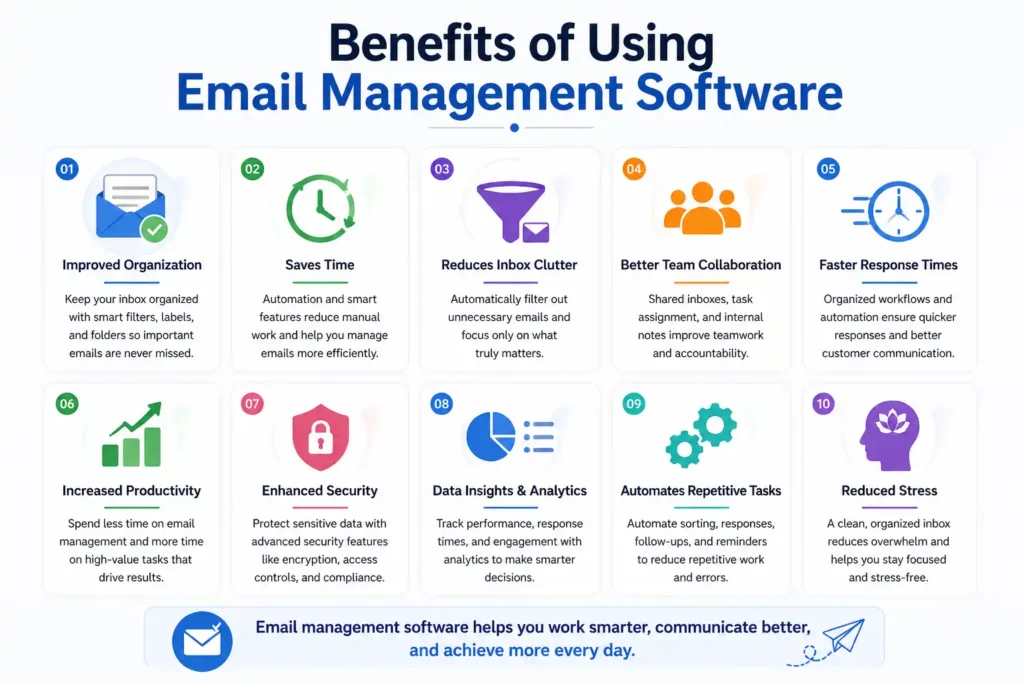
Email management software offers several benefits that directly impact productivity and communication. Studies show that automation can save professionals up to 6 hours per week. These tools help organize inboxes, reduce clutter, and ensure important emails are not missed. They also improve communication by enabling faster and more structured responses. Automation features reduce repetitive tasks, allowing users to focus on high-value work. Additionally, a well-managed inbox reduces stress and improves mental clarity. Overall, email management tools enhance efficiency, streamline workflows, and create a more organized and productive work environment for individuals and teams.
Tips to Improve Email Management (With or Without Tools)
Improving email management does not always require advanced tools; simple strategies can also make a significant difference. The “Inbox Zero” method, introduced by productivity expert Merlin Mann, focuses on keeping your inbox empty or near zero. Using filters and labels helps organize emails automatically. Scheduling specific times to check emails reduces constant interruptions and improves focus. Unsubscribing from unnecessary newsletters minimizes clutter. Combining these practices with email management tools can further enhance efficiency. By adopting these habits, users can maintain a clean inbox and improve their overall productivity and communication effectiveness.
FAQs
What is the best email management tool?
The best email management tool depends on your needs. SaneBox is great for individuals, while Missive and Front are ideal for teams. For customer support, Zendesk is a strong option. Each tool offers unique features, so the best choice varies based on your workflow and requirements.
Are email management tools free?
Some email management tools offer free plans or trials, but most advanced features are available in paid versions. Free tools usually provide basic functionality, while premium plans include automation, analytics, and collaboration features that significantly improve productivity and efficiency.
Which tool is best for Gmail?
Hiver and DragApp are among the best tools for Gmail users. They integrate directly with Gmail and enhance its functionality with collaboration, workflow management, and automation features, making email handling more efficient without leaving the Gmail interface.
How do email management tools work?
Email management tools work by organizing, prioritizing, and automating email workflows. They use filters, AI, and rules to sort messages, schedule emails, and manage responses. These tools reduce manual effort and help users handle large volumes of emails efficiently.
Can email tools improve productivity?
Yes, email management tools can significantly improve productivity. Research shows that automation and better organization reduce the time spent on emails. By streamlining workflows and minimizing distractions, these tools allow users to focus on more important tasks and improve overall efficiency.
Conclusion
Email management tools have become essential for handling modern communication efficiently. From organizing inboxes to automating repetitive tasks, these tools help individuals and businesses save time and improve productivity. Choosing the right tool depends on your specific needs, whether it’s personal use, team collaboration, or customer support. By understanding features, comparing options, and aligning tools with your workflow, you can achieve better results. Start by identifying your requirements and try a tool that fits your goals. The right choice can transform how you manage emails and significantly boost your overall efficiency.
✨ Got value? Let’s keep the momentum, follow Tech Statar.










































One thought on “Best Email Management Tools for 2026 – Detailed Guide”