

What Is Google Lens?
Google Lens is an AI-powered visual search tool developed by Google that helps you understand the world through your camera instead of traditional text searches. Rather than typing keywords, you simply point your phone at an object, document, product, or landmark, and Google Lens analyzes the image using machine learning, computer vision, and Google’s Search index to deliver relevant information. It can identify objects, translate text, copy printed content, solve homework, recognize plants, and even find products online. Available on Android, iPhone, Google Photos, and Chrome, Google Lens has become one of Google’s most practical AI tools for everyday tasks.
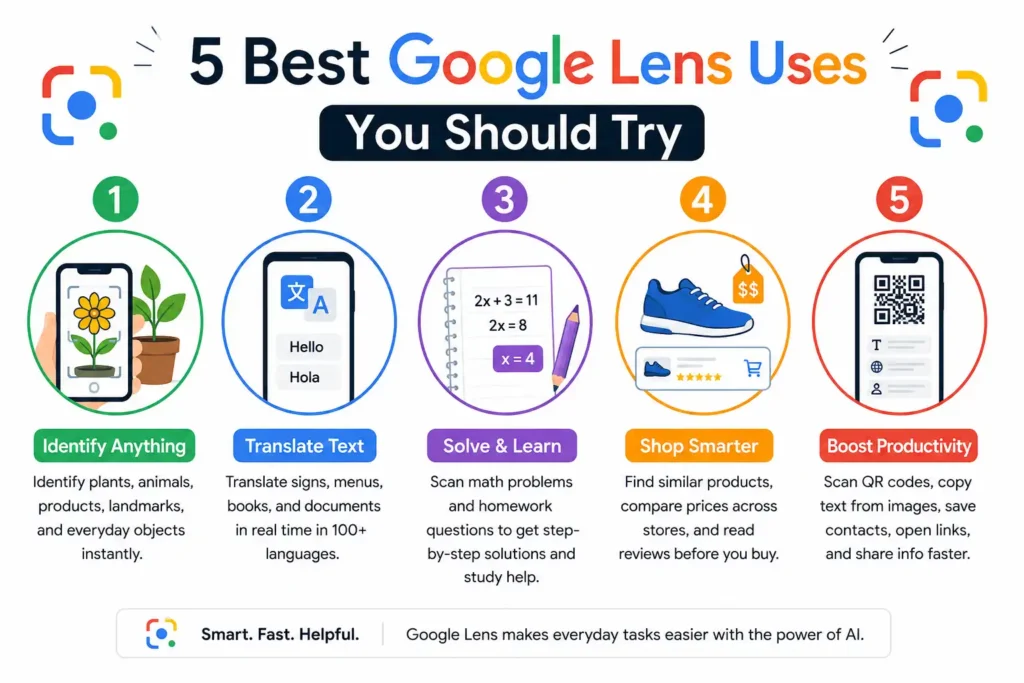
Use #1 – Instantly Identify Plants, Animals, and Everyday Objects
One of the most impressive uses of Google Lens is its ability to recognize objects in seconds. Whether you’re hiking, shopping, traveling, or simply curious about something around you, the app can identify thousands of plants, animals, landmarks, household products, and consumer goods. Google combines advanced image recognition with its massive Search database to provide accurate results. While identification accuracy depends on image quality, clear photos usually produce reliable matches, making Google Lens a convenient visual search companion for everyday life.
Identify Flowers, Trees, Pets, and Wildlife
Have you ever spotted a beautiful flower or unusual bird and wondered what it was? Google Lens can instantly identify many species by comparing your photo with Google’s visual database. It helps gardeners recognize plants, travelers identify wildlife, and pet owners learn more about different breeds. Better lighting and close-up images usually improve identification accuracy.
Learn About Products, Landmarks, and Household Items
Google Lens can recognize everyday objects, famous landmarks, electronics, furniture, artwork, and branded products. Simply scan the item to discover detailed information, customer reviews, specifications, historical facts, or online shopping options. This feature is especially useful when visiting museums, exploring new cities, or researching unfamiliar products before making a purchase.
When Google Lens Delivers the Most Accurate Results
Google Lens performs best when images are sharp, well-lit, and focused on a single subject. Avoid blurry photos, crowded backgrounds, or partially hidden objects. Google’s official guidance also recommends keeping your app updated because improvements to AI models continually enhance recognition accuracy, object detection, and search relevance across supported devices.
🌟 Recommended for You: QR Code Blurred? Causes, Fixes & Solutions
Use #2 – Translate Text in Real Time While Traveling or Learning
The tool can instantly translate text captured through your camera, making it valuable for international travel, education, and daily communication. Instead of manually typing unfamiliar words, simply point your camera at signs, menus, labels, books, or printed documents to receive an instant translation. Google Translate powers this feature, supporting more than 100 languages for various translation experiences. It saves time, improves comprehension, and makes navigating unfamiliar environments significantly easier.
Translate Signs, Menus, Books, and Documents
Whether you’re visiting another country or studying a foreign language, Google Lens can translate restaurant menus, road signs, instruction manuals, textbooks, and printed documents almost instantly. The translated text appears directly over the original image, creating a smooth augmented reality experience that feels natural and easy to understand.
Copy, Listen to, and Save Translated Text
Beyond translation, Google Lens allows users to copy translated text, listen to pronunciation, and save important information for later. Students can extract notes from textbooks, travelers can save directions, and professionals can quickly convert printed content into editable digital text without manually typing everything.
Best Scenarios for Real-Time Language Translation
Real-time translation is especially useful during international travel, business meetings, shopping, airport navigation, hotel check-ins, museums, and classroom learning. Because Google Lens integrates with Google Translate, it delivers fast, context-aware translations that help users understand unfamiliar languages while maintaining a smooth, practical mobile experience.
🌟 Recommended for You: How Artificial Intelligence Is Accelerating Scientific Discovery
Use #3 – Solve Homework best for students
Google Lens has become a valuable educational tool for students, teachers, and lifelong learners. By scanning printed questions or handwritten equations, users can receive explanations, learning resources, and related educational content within seconds. The Homework feature, powered by Google’s educational search capabilities, helps learners understand concepts instead of simply finding answers. While it should never replace critical thinking or classroom instruction, Google Lens serves as an excellent study companion for reviewing lessons, checking work, and exploring complex academic topics more efficiently.
Scan Maths Equations for Step-by-Step Solutions
Students can scan algebra, geometry, arithmetic, and other mathematical equations using Google Lens. In many cases, the app provides step-by-step solution methods through trusted educational partners, helping learners understand how problems are solved rather than simply displaying the final answer, which supports stronger mathematical learning.
Get Help with Science, History, and Other Subjects
Google Lens can recognize textbook pages, classroom worksheets, diagrams, historical information, scientific concepts, and educational questions. It surfaces relevant articles, definitions, videos, and trusted learning resources that allow students to deepen their understanding while verifying information from credible educational sources available through Google Search.
Use Google Lens as a Smart Learning Assistant
Instead of replacing learning, Google Lens supports it by helping students verify answers, understand unfamiliar concepts, and access additional explanations quickly. Combined with Google Search and educational resources, it encourages independent research, visual learning, and faster information discovery while promoting better study habits and academic confidence.
🌟 Recommended for You: 12 Unique Business Ideas to Start in 2026
Use #4 – Shop Smarter by Finding Similar Products and Better Prices
Google Lens makes online and in-store shopping much easier by turning your smartphone camera into a visual shopping assistant. Instead of searching with product names, you can scan an item to find similar products, compare prices, discover different colours or styles, and view where it’s sold online. Google Lens also connects with Google Shopping and Search to display relevant listings, images, and product information. Whether you’re buying clothes, furniture, gadgets, or home décor, this feature helps you make informed purchasing decisions while saving both time and money.
Compare Prices Across Online Stores
Found a product in a local shop? Scan it with Google Lens to compare prices from multiple online retailers within seconds. You can quickly identify better deals, check product availability, and explore different sellers before making a purchase. This visual search approach reduces manual searching and helps shoppers find competitive prices more efficiently.
Discover Similar Products from Different Brands
Sometimes you like a product’s design but want a more affordable or premium alternative. Google Lens identifies visually similar products from different brands, allowing you to compare features, colours, sizes, and styles. This makes it easier to explore alternatives without knowing the product’s exact name or manufacturer beforehand.
Read Reviews Before Making a Purchase
Buying without research can lead to disappointment. Google Lens helps you access customer reviews, ratings, product specifications, and additional information directly from Google Search. Reading verified user feedback before purchasing gives you greater confidence, helping you choose products that offer better quality, value, and long-term satisfaction.
🌟 Recommended for You: Best AI Tools for Writing Marketing Copy (2026 Guide)
Use #5 – Scan QR Codes, Extract Text, and Improve Productivity
Google Lens is also a powerful productivity tool that simplifies everyday digital tasks. Beyond visual search, it can scan QR codes, extract printed text, digitize documents, copy information, and interact with content captured through your camera. Instead of switching between multiple apps, Google Lens combines several useful functions into one experience. Whether you’re working, studying, or managing personal tasks, these features reduce manual effort and improve efficiency by helping you capture, organize, and share information more quickly.
Copy Text from Printed Pages and Images
Typing information manually can be slow and error-prone. Google Lens uses optical character recognition (OCR) to extract text from books, documents, receipts, posters, handwritten notes, and images. Once recognized, the text can be copied, translated, searched, or shared, making it especially useful for students, researchers, and office professionals.
Scan QR Codes Without Installing Extra Apps
Most modern Android devices and many iPhones support QR code scanning directly through Google Lens. Simply point your camera at the code to instantly open websites, join Wi-Fi networks, access restaurant menus, download apps, or view digital documents. There’s no need to install a separate QR scanner for everyday use.
Save Contacts, Open Websites, and Share Information Faster
Google Lens can recognize phone numbers, email addresses, business cards, and web links printed on documents or displayed on another screen. With a single tap, you can save contacts, visit websites, send emails, or call businesses instantly. This automation eliminates repetitive typing and streamlines common digital interactions throughout the day.
More Useful Google Lens Features You Should Try
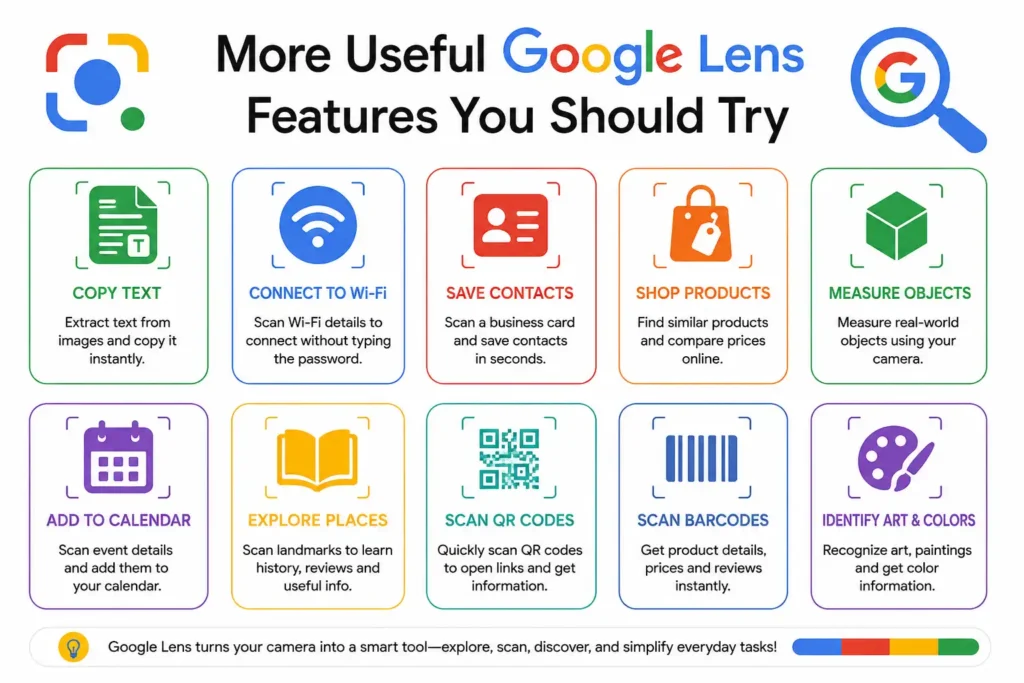
Although many people use Google Lens for translation or object recognition, it offers several lesser-known features that can significantly improve everyday productivity. From searching screenshots to identifying meals and famous landmarks, Google Lens continues to expand its AI capabilities through Google Search. Exploring these additional tools allows users to accomplish more with a single app while reducing the need for multiple specialized applications. These hidden features make Google Lens an even more valuable companion for work, travel, learning, and entertainment.
Search Using Screenshots Instead of Typing
Instead of describing something with keywords, simply open a screenshot in Google Photos and launch Google Lens. It can identify products, logos, text, landmarks, clothing, or objects directly from the image. This visual search method often delivers faster and more precise results than traditional keyword searches.
Scan Business Cards and Save Contact Details
Manually entering contact information takes time and increases the chance of mistakes. Google Lens automatically detects names, phone numbers, email addresses, company names, and websites on business cards. You can instantly save the details to your contacts, making networking and professional communication much more efficient.
Identify Food Dishes and Find Recipes
See an interesting meal at a restaurant or on social media? Google Lens can identify many popular dishes and provide related recipes, ingredients, nutritional information, and nearby restaurants serving similar food. Home cooks can also discover cooking ideas without knowing the exact name of the dish beforehand.
Recognize Paintings, Monuments, and Famous Places
Google Lens is an excellent travel companion for exploring history, culture, and art. Scan paintings, sculptures, historical monuments, or famous landmarks to instantly learn their background, creator, historical significance, and related information. This transforms museums, galleries, and sightseeing trips into interactive learning experiences.
Tips to Get the Most Accurate Results with Google Lens
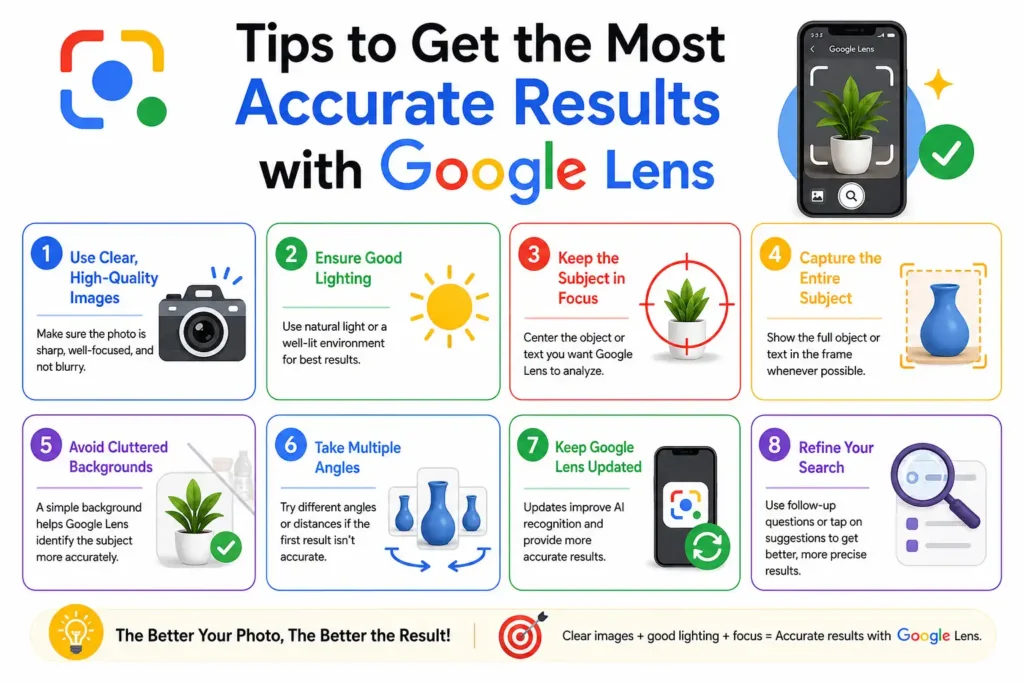
Like any AI-powered visual recognition system, Google Lens performs best when provided with clear, high-quality images. While Google’s machine learning models continue to improve, following a few simple best practices can noticeably increase recognition accuracy. Better lighting, proper focus, and updated software all contribute to more reliable search results. Whether you’re identifying products, translating text, or scanning documents, these practical tips help Google Lens interpret images correctly and deliver the most relevant information for your search.
Capture Clear, Well-Lit Images
Lighting has a major impact on visual recognition accuracy. Capture photos in natural or bright lighting whenever possible, avoid heavy shadows, and keep your camera steady. Sharp, high-resolution images give Google Lens more visual details to analyse, resulting in faster identification and more reliable search results.
Focus on the Correct Object Before Scanning
For the best results, ensure the object you want to identify fills most of the camera frame. Remove unnecessary background distractions and tap the subject to focus before scanning. A clear subject helps Google’s AI distinguish important visual features and reduces the chances of incorrect matches.
Keep Google Lens and Your Device Updated
Google regularly improves Lens with new AI models, expanded language support, better object recognition, and enhanced visual search capabilities. Keeping the Google app, Google Photos, Chrome, and your smartphone updated ensures you benefit from the latest performance improvements, security updates, and newly released Google Lens features.
🌟 Recommended for You: Designing LLM-Friendly Interfaces That Drive Developer ROI
Common Limitations of Google Lens and How to Overcome Them
While Google Lens is one of the most advanced visual search tools available today, it is not perfect. Like any AI-powered technology, its accuracy depends on image quality, available online information, and the complexity of the object being scanned. It may occasionally misidentify rare items or provide incomplete results. By combining Google Lens with trusted sources and following a few simple best practices, you can significantly improve search accuracy and make more informed decisions.
Situations Where Google Lens May Be Less Accurate
Google Lens may struggle with blurry photos, poor lighting, partially hidden objects, or items that look visually similar. Rare plants, uncommon animal species, handmade products, and newly released items may also produce less accurate matches. Taking multiple clear photos from different angles usually improves recognition and helps Google’s AI identify the correct subject.
Privacy and Permission Considerations
Google Lens requires camera access to scan objects and may request permission to access your photos when analyzing saved images. Before scanning sensitive documents containing personal or financial information, review your device’s privacy settings and Google’s privacy controls. Being mindful of what you scan helps protect your personal information and digital security.
Alternative Ways to Verify Search Results
Although Google Lens is highly capable, it’s always wise to verify important information. Cross-check product details through official brand websites, confirm plant or animal identifications using trusted field guides, and compare facts with reputable educational or government sources. Using multiple reliable references improves accuracy, especially for health, legal, academic, or financial topics.
Frequently Asked Questions About Google Lens
Is Google Lens Free to Use?
Yes. Google Lens is completely free to use. It is available through the Google app, Google Photos, Chrome, and many Android devices without requiring a subscription. As long as you have a compatible device and internet connection for most features, you can access its visual search capabilities at no cost.
Can Google Lens Identify Everything?
No. While Google Lens can recognize millions of objects, products, landmarks, plants, animals, and text, it cannot identify everything with perfect accuracy. Rare objects, poor-quality images, or subjects with limited online information may result in incorrect or incomplete matches. Human verification is still important for critical decisions.
Does Google Lens Work Offline?
Some basic on-device functions may work without an internet connection, depending on your device and downloaded language packs. However, most Google Lens features, including visual search, object recognition, shopping results, and detailed information, require an active internet connection because they rely on Google’s cloud-based search and AI systems.
Is Google Lens Available on iPhone and Android?
Yes. Google Lens is available on both Android and iPhone. Android users often have Lens built directly into the Camera app, Google app, or Google Photos. iPhone users can access the same core features through the Google app and Google Photos after downloading them from the App Store.
How Accurate Is Google Lens for Product Searches?
Google Lens is generally very accurate when identifying popular consumer products with clear branding or distinctive designs. It performs especially well for clothing, electronics, books, home décor, and packaged goods. However, results can vary for custom-made, vintage, or unbranded products, so comparing multiple listings is always recommended.
🌟 Recommended for You:
Conclusion
Google Lens has evolved far beyond a simple image recognition tool. Powered by artificial intelligence and Google’s extensive Search ecosystem, it helps users identify objects, translate languages, solve homework, compare products, scan QR codes, extract text, and complete everyday tasks more efficiently. Whether you’re travelling, studying, shopping, or simply satisfying your curiosity, Google Lens offers practical solutions that save time and improve productivity. While no AI tool is flawless, using clear images and verifying important information with trusted sources will help you get the most accurate results. As Google continues to enhance its AI capabilities, Google Lens is expected to become even more powerful, making visual search an essential part of how people discover and interact with information.
✨ Stay ahead of the curve. Follow Tech Statar.































2 thoughts on “5 Best Google Lens Uses You Should Try”