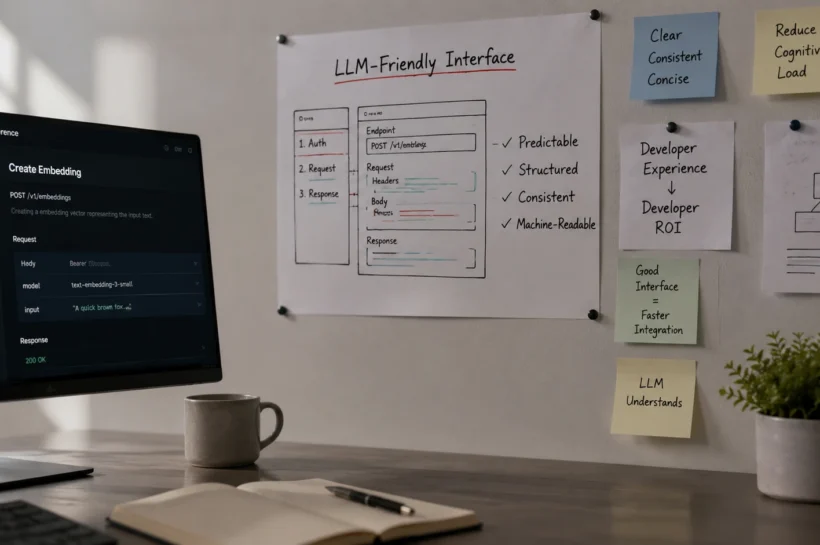

Designing LLM-Friendly Interfaces That Drive Developer ROI
You shipped an AI product. The model is strong. The demo wows people in the room. But developers sign up, poke around for ten minutes, and leave before they build anything real. Your team keeps answering the same setup questions in support. And the board wants to know when all of this turns into revenue.
The problem is rarely the model. It is the interface that developers meet first. That means your API, your SDK, your sample code, your docs, and the way you explain a brand-new way of working. Get that surface right and adoption follows. This blog shows you how to design LLM-friendly interfaces and landing pages that can reach developers quickly, and your AI product pays back.
What is an “AI-friendly interface,” really?
For any product. It is every surface that a developer touches to know about your offerings and get work done. For an AI-first company, agent design is really important; you need to keep in mind that your tool will be used by developers.
Your working code samples, your documentation, and the placement of each element require close attention. In 2026, it also includes how your product is perceived by the LLMs, because that is where many developers now look for tools and products; therefore, it is important to get your landing page designed by an agency that can create AI-friendly interfaces and landing pages.
Why does interface design decide your ROI?
Because developer ROI is mostly about time. Specifically, the time between signing up and the first real result. Teams call this time-to-value, or time-to-first-call.
When that time is short, good things happen. Developers feel the product works, so they keep going. Your support team answers fewer “how do I start” tickets, so your engineers stop acting as a help desk. And word spreads, because developers tell other developers what saved them an afternoon.
When that time is long, the opposite happens. People churn before they ever see value. Support load climbs. Your sales team has to push a product that should be selling itself. So the interface is not a small design detail. It is the lever that determines whether your AI spend drives adoption or goes unused.
💝Expand Your Knowledge: Best Website Security Tools
What does a high-ROI AI interface actually do?
A few design choices make the difference between product adoption and abandonment.
It gets them to a working result fast: A clear, quick start and a runnable “hello world” beats a long overview every time.
It shows real code, not claims: Developers trust a working snippet more than a feature list. Give them copy-paste examples with brief comments explaining each step.
It explains the new way of working in plain terms: If your agent acts on its own, say what it does, what it will not do, and how the developer keeps control. Trust is part of the interface, not a separate marketing job.
It is readable by machines too: Clean, structured docs help AI coding tools answer questions about your product correctly. Thin docs make those same tools give you the wrong answers.
None of this is always about looking pretty. It is about removing the small frictions that make a busy developer give up on the tool, and LLMs ignore it.
Where do teams get this wrong?
Many AI products bury the quickstart under a wall of background, so a developer reads for five minutes before touching code. Others gate the real product behind a sales call, which kills the momentum of someone who wants to try it right now.
Some explain the model in detail but never show a single end-to-end example, so the developer understands the technology but still cannot use it. And almost everyone treats documentation as an afterthought, written once at launch, then left to rot while the product changes.
Each of these adds minutes and doubt at exactly the moment a developer is deciding whether you are worth their time.
A real example: turning a new interface into fast adoption
Look at Kubiya.ai, a platform for conversational DevOps agents. Their product introduced a genuinely new way to work: running workflows from a Slack command rather than a dashboard. That is exactly the kind of unfamiliar interface that is hard to explain.
Working with the team at Infrasity, they rebuilt the developer-facing surface with speed in mind. They scripted and produced a self-guided platform tour that showed how a Slack command could turn into an automated workflow in minutes.
They revamped their SDK documentation and Quick Start, so developers could build a “Hello World” agent in hours instead of days. And they published use-case content such as “5 ChatOps Workflows with Kubiya,” one of which reached Google’s first page within a week.
The lesson is very simple. The product did not change. The interface to it did, which made it easy to adopt.
How will AI tools change the interface in 2026?
Your interface now has a second audience, and it isn’t human. AI assistants read your docs and then recommend your product, or fail to. Vercel, for example, reports that around 10% of its new signups now come from ChatGPT referrals. That is a direct line from clear, structured docs to signups.
So your documentation does double duty. It onboard humans and teaches AI tools how to use and recommend your product. If your setup pages are vague, an AI assistant will hand a developer the wrong steps, and you will get blamed for a “bug” that is really a docs gap.
How do you measure if your interface is working?
Page views don’t tell you whether developers are building. Track the moments that show real progress inste
Time-to-first-call: how long from signup to a developer’s first successful API call.
Activation rate: the share of signups who reach a first working result.
Support deflection: fewer repeat “how do I start” tickets as your docs improve.
Adoption depth: developers moving from one call to steady, repeated use.
Watch these every month. If time-to-first-call drops and activation rises, your interface is doing its job, and your ROI question gets much easier to answer.
💝Expand Your Knowledge: Business Process Monitoring Guide
Outcomes and next steps
Here is what good interface design gives you. Developers reach value faster, so more of them stay. Your engineers stop drowning in setup questions. AI tools recommend you correctly. And your AI product starts proving its return on investment, rather than burning through the budget after a flashy launch.
Three steps to start this week. Sign up as a brand-new developer and time how long it takes for a first result to appear. Then fix the slowest step, which is usually the quickstart or a missing code sample. Lastly, read your docs as if you were an AI assistant trying to follow them, and clarify anything ambiguous. Do those three, and adoption stops being a mystery.
FAQs
What is “time-to-first-call” and why does it dictate AI developer ROI?
Time-to-first-call is the exact duration between a developer creating an account and successfully executing their first API request or agent workflow. It is the most critical metric for developer ROI because it directly controls activation. A short time-to-first-call builds immediate trust, minimizes support overhead, and drastically reduces churn before users ever hit a paywall.
How do AI tools like Cursor and Copilot change how we should write API documentation?
In 2026, AI coding assistants are the secondary audience for your documentation. If your docs are unstructured, lack clear code samples, or bury endpoints in vague text, LLMs will generate hallucinated or incorrect code for your users. Clean, machine-readable, and well-structured documentation ensures these tools accurately recommend and implement your product.
What are the essential components of a high-converting developer quickstart?
An effective quickstart prioritizes a runnable “hello world” over lengthy architectural overviews. It must include clear prerequisites, copy-pasteable code snippets, and brief inline comments explaining new paradigms (like how your specific agent operates). The goal is to get a working result on the developer’s local machine in under five minutes.
Should we gate our AI developer product behind a mandatory sales call?
No. Gating an AI interface behind a book a demo form instantly kills developer momentum. Developers evaluate tools by building with them, not by watching slide decks. Instead of a mandatory sales call, offer a self-serve sandbox or free tier with an intuitive quickstart, allowing the product’s fast time-to-value to automatically qualify the lead for your sales team.
How can I optimize my AI product’s interface for LLMs and AI search engines?
To optimize for machine readability, use strict semantic HTML in your docs, provide complete end-to-end code examples rather than fragmented snippets, and explicitly state what your AI agent cannot do. When your API’s constraints and capabilities are clearly mapped out, AI assistants can confidently parse the context and route relevant queries directly to your solution.
Why do developers abandon AI products even when the underlying LLM is highly capable?
Developers churn because of interface friction. If a developer has to spend an hour fighting an SDK, deciphering outdated documentation, or waiting for a support ticket just to authenticate their API key, they will leave before ever experiencing the model’s power. The interface is the delivery mechanism for the model’s value; if it fails, the product fails.
🔷One post is never the full picture. Follow Tech Statar for the rest.