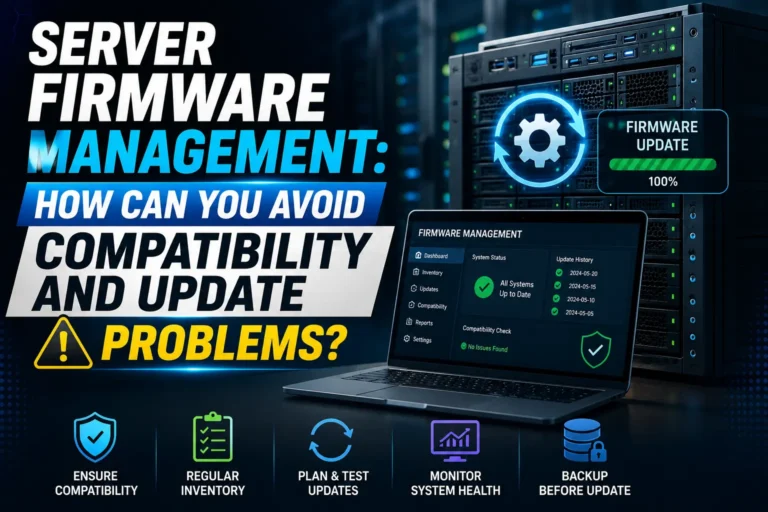

Server Firmware Management: How Can You Avoid Compatibility and Update Problems?
Server firmware sits between a server’s hardware and the software that controls it. Components such as the system BIOS or UEFI, RAID controllers, network adapters, storage controllers, management controllers, and other hardware devices may all depend on firmware to operate correctly.
Keeping this firmware updated is important for server performance, hardware compatibility, security, and reliability. However, updating firmware is not as simple as downloading the newest version and installing it immediately. An update that is unsuitable for a particular server model, operating system, driver, or hardware configuration can create unexpected problems.
This is why businesses need a structured server firmware management process. Instead of treating firmware updates as isolated maintenance tasks, IT teams should manage versions, dependencies, testing, deployment, and verification as part of the server lifecycle.
So, how can organizations avoid compatibility problems while keeping server firmware current?
What Is Server Firmware Management?
Server firmware management is the process of identifying, monitoring, testing, deploying, and verifying firmware across server hardware.
Firmware can control critical components including:
BIOS or UEFI
Baseboard management controllers
RAID and storage controllers
Network interface cards
Host bus adapters
Disk and SSD firmware
Power and system management components
Modern enterprise platforms often provide tools that help administrators maintain a consistent firmware baseline across multiple systems. For example, HPE provides Service Pack for ProLiant (SPP), Smart Update Manager, OneView, and other management options for supported environments. HPE recommends using tested firmware and driver baselines to maintain compatibility.
Why Can Server Firmware Updates Cause Compatibility Problems?
Firmware does not operate independently. It interacts with hardware, drivers, operating systems, hypervisors, storage systems, and management software.
For example, updating a storage controller may require a compatible driver version. Similarly, a server BIOS update may change hardware behavior that affects an operating system or virtualization environment.
Compatibility problems can occur when administrators:
Install firmware intended for a different server model.
Skip required intermediate versions or prerequisites.
Mix firmware baselines across similar infrastructure.
Update firmware without checking driver compatibility.
Use unofficial or incorrect firmware packages.
Perform updates without reviewing vendor release notes.
Update production servers before testing.
The solution is not to avoid firmware updates. Instead, organizations should introduce a controlled process that determines what should be updated, when it should be updated, and how it should be validated.
How Should You Check Firmware Compatibility before an Update?
Before deploying a firmware package, identify the exact hardware and software environment.
Start by recording the server manufacturer, model, generation, installed components, current firmware versions, operating system, and hypervisor where applicable.
Then check the manufacturer’s documentation for the target firmware version.
Look specifically for:
Supported server models
Supported hardware revisions
Required driver versions
Supported operating systems
Required minimum firmware versions
Installation prerequisites
Known issues
Reboot requirements
Downgrade or rollback limitations
Vendor release notes are particularly important because the newest firmware version is not automatically the correct version for every environment.
For example, HPE’s firmware management documentation emphasizes environment-specific firmware baselines and recommends keeping firmware and drivers aligned where applicable. Eaglercraft Servers also highlights the importance of compatible firmware, drivers, and hardware configurations when maintaining reliable server performance and system stability.
How Can You Build a Safe Firmware Update Process?
A reliable process should begin with inventory and assessment, followed by testing and controlled deployment.
What Should You Document Before Updating Firmware?
Maintain an inventory containing:
Server model and serial number
Hardware components
Current firmware versions
Operating system or hypervisor
Current drivers
Target firmware versions
Maintenance windows
Backup and recovery information
This inventory gives administrators a baseline that can be compared after an update.
It also makes troubleshooting easier if something goes wrong.
Why Should You Test Firmware Updates Before Production?
If your organization has multiple servers with similar configurations, update a representative non-production system first. Test normal workloads, storage connectivity, network connectivity, virtualization, monitoring, and management functions.
If the test system behaves normally, the same firmware baseline can be considered for production deployment after reviewing the remaining differences between environments.
For larger environments, firmware management platforms can help maintain consistent baselines across server groups. HPE, for example, supports firmware baselines through OneView and related management tools.
When Should You Schedule Server Firmware Updates?
Firmware updates should normally be performed during a planned maintenance window, particularly when they require a server reboot or could affect hardware availability.
Before the maintenance window:
Review the firmware release notes.
Confirm compatibility.
Verify backups and recovery options.
Record current firmware versions.
Test the update where possible.
Prepare the required firmware packages.
Confirm remote management access.
Notify affected users or teams.
HPE specifically recommends developing an update plan and ensuring a recent backup is available before deploying updates to business-critical or complex environments.
Can Firmware and Drivers Be Updated Together?
In many environments, firmware and drivers are closely related, so updating them as a coordinated baseline can reduce compatibility problems.
However, the correct approach depends on the hardware vendor, server model, operating system, and management platform.
For example, HPE recommends updating firmware and drivers together in certain managed environments to maintain a consistent baseline.
This does not mean administrators should blindly update every driver whenever firmware changes. Instead, follow the vendor’s compatibility matrix and release documentation.
Using multiple independent tools to manage the same firmware environment can also create conflicts. HPE recommends avoiding multiple firmware-management mechanisms for the same managed device.
How Can You Reduce the Security Risks of Firmware Updates?
Firmware management is also a cybersecurity concern.
Firmware operates at a low level and can affect fundamental system functionality. NIST’s Platform Firmware Resiliency Guidelines emphasize protection against unauthorized firmware modification, authenticated updates, integrity protection, detection, and recovery.
Organizations should therefore:
Obtain firmware from trusted manufacturer sources.
Verify firmware authenticity where supported.
Restrict administrative access to management interfaces.
Protect remote management controllers.
Maintain records of firmware versions.
Monitor unexpected firmware changes.
Have recovery procedures available.
A firmware update should never be treated as simply a file download. Its source, authenticity, compatibility, and deployment method all matter.
What Should You Check After a Firmware Update?
Completing the installation does not mean the process is finished.
After rebooting, verify:
Server boots normally.
BIOS/UEFI settings remain correct.
Operating system loads successfully.
Storage volumes are available.
RAID controllers report normal status.
Network interfaces work correctly.
Virtual machines or applications operate normally.
Management interfaces remain accessible.
Monitoring tools report the server correctly.
Firmware versions match the intended baseline.
HPE recommends reviewing firmware compliance after successful updates, which illustrates the importance of verification rather than assuming that a completed update was successful.
Use Case: How Can a Business Avoid a Firmware Compatibility Issue?
An administrator discovers a new firmware release and immediately installs it on one production server. After the reboot, the server experiences unexpected network-driver behavior.
A safer approach would have been to check the vendor’s compatibility documentation, test the firmware on a non-production server, confirm the corresponding driver requirements, and then schedule a controlled production rollout.
This simple process can prevent an update from becoming an unexpected service outage.
How Can Businesses Improve Long-Term Firmware Management?
Firmware management becomes much easier when it is treated as an ongoing lifecycle process rather than an emergency task.
Organizations should maintain a defined firmware baseline for each server group and regularly review vendor advisories and available updates.
For larger infrastructures, centralized management tools can provide additional visibility into firmware compliance and make it easier to apply consistent baselines across multiple servers. HPE documentation, for example, describes using server profiles and firmware baselines to manage firmware across multiple systems, while server supply provides enterprise server hardware and components for organizations managing multi-server environments.
The goal is not necessarily to install every new firmware release immediately. Instead, the goal is to maintain a supported, secure, tested, and compatible configuration.
Conclusion
Effective server firmware management requires more than keeping hardware updated. IT teams need to understand the relationships between firmware, drivers, operating systems, hardware components, virtualization platforms, and management tools.
Before every update, verify compatibility, review vendor documentation, maintain backups, test where possible, and schedule production changes carefully. After deployment, verify that the server and its workloads continue to operate correctly.
A controlled firmware lifecycle ultimately helps businesses reduce compatibility problems, minimize downtime, improve security, and keep their server infrastructure reliable over time.
FAQs
How often should server firmware be updated?
There is no universal schedule. Review vendor security advisories and firmware releases regularly, then prioritize updates based on security fixes, bugs, hardware compatibility, and business requirements.
What happens if server firmware is not updated?
Outdated firmware can leave known issues or security vulnerabilities unresolved and may cause compatibility problems with newer hardware, drivers, operating systems, or other infrastructure components.
Should you update server firmware immediately when a new version is released?
Not necessarily. Review the release notes and compatibility requirements first. For critical production systems, test the update where possible and deploy it during a controlled maintenance window.
⚡ Upgrade your thinking. Follow Tech Statar.