
LCD screen bleeding is a common display issue that can make dark scenes look uneven, especially around the edges and corners of a screen. It happens when light from the display’s backlight leaks through areas where it shouldn’t.
A small amount of backlight bleeding can be difficult to notice during everyday use. Severe bleeding, however, can become distracting when watching movies, playing games, or working with dark interfaces.
The good news is that not every bright patch means your screen is defective. Some issues that look like backlight bleeding, such as IPS glow, are normal characteristics of certain LCD panels.
In this guide, we’ll explain what LCD screen bleeding is, what causes it, how to test for it, ways to reduce or fix it, and how to prevent it when buying or handling an LCD display.
What Is LCD Screen Bleeding?
LCD screen bleeding, also called backlight bleeding, occurs when light from an LCD panel’s backlight escapes unevenly around the edges or corners of the screen.
LCD displays use a backlight because their liquid crystal layer doesn’t produce its own light. Ideally, this light should illuminate the display evenly. But imperfections in the panel, frame, or assembly can allow some of the backlight to leak through.
You’ll usually notice it as:
- Bright patches along the edges
- White or yellowish areas in the corners
- Uneven illumination on a black screen
- Light that becomes more obvious at high brightness
- Bright spots that are particularly noticeable in dark scenes
For example, if you display a completely black image in a dark room, a screen with backlight bleeding may appear black in the center while showing brighter patches near one or more corners.
A little bleeding isn’t necessarily unusual for an LCD panel. The important question is whether it is noticeable enough to interfere with normal use.
What Causes LCD Screen Bleeding?
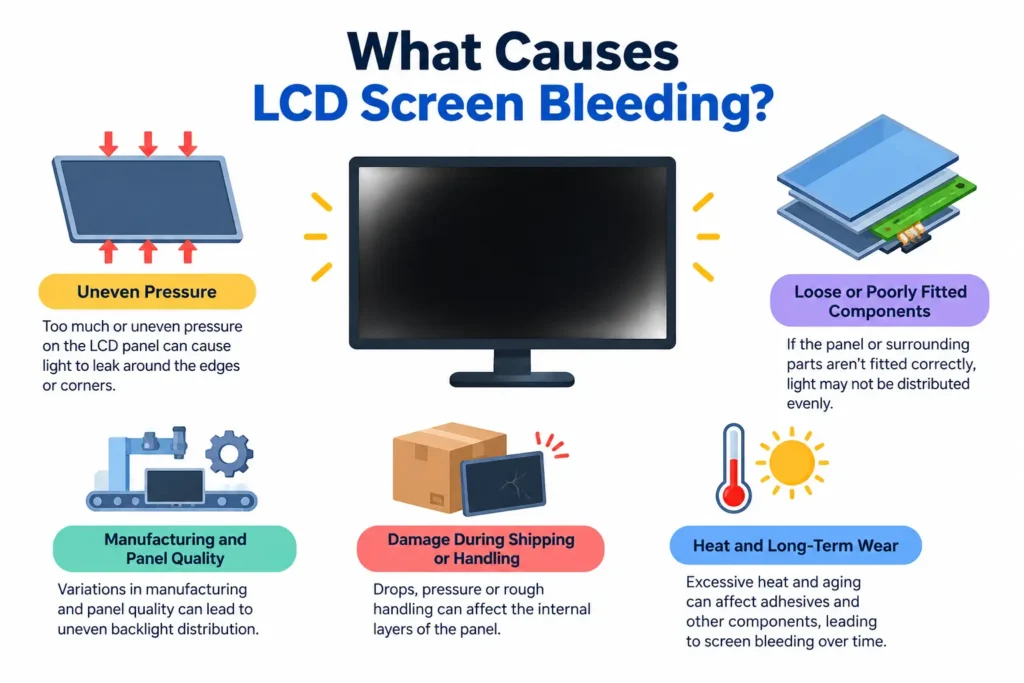
There isn’t always one specific cause of backlight bleeding. It can result from the construction of the LCD panel, pressure on the display, manufacturing tolerances, or physical damage.
Uneven Pressure on the LCD Panel
One of the most common causes is uneven pressure around the display.
An LCD panel consists of several thin layers that need to remain properly aligned. If the panel is pressed too tightly against its frame, certain areas may allow more backlight through than others.
This can happen because of:
- A tightly fitted bezel
- Uneven mounting pressure
- Screws tightened too much
- A frame pressing against the panel
- Internal components pushing against the display
The result can be localized bright spots around the edges or corners.
Loose or Poorly Fitted Display Components
The opposite problem can also occur. If the panel or its surrounding components aren’t fitted correctly, the display may not distribute light evenly.
This is more likely to be a manufacturing or assembly issue than something you can safely fix yourself.
Manufacturing and Panel Quality
Some degree of variation exists between individual LCD panels.
Two displays using the same model and panel technology can have slightly different levels of uniformity. Manufacturing tolerances, assembly quality, and panel construction can all affect how evenly the backlight is distributed.
This is one reason why backlight bleeding isn’t always consistent across every unit of the same monitor or laptop model.
Damage During Shipping or Handling
LCD panels are relatively delicate.
Dropping a device, applying pressure to the screen, squeezing it inside a bag, or mishandling the display during installation can damage or shift internal layers.
Even if the glass itself isn’t cracked, physical stress can affect the panel’s uniformity.
Heat and Long-Term Wear
Heat isn’t usually the primary cause of backlight bleeding, but excessive temperatures can contribute to display deterioration over time.
Repeated exposure to high temperatures can affect adhesives, materials, and other components inside a display.
For that reason, keeping your device within its recommended operating temperature is a sensible way to protect the panel over the long term.
What Does Screen Bleeding Look Like?
The easiest way to recognize backlight bleeding is to look at your display while showing a completely black image in a dark environment.
Typical signs include:
- Bright areas around the corners
- Light leaking inward from the edges
- Uneven white, yellow, or gray patches
- Brightness that appears stronger in certain areas
- Light that remains fixed in the same location
The effect is usually most noticeable when the screen displays very dark content.
For example, you might notice it while watching a movie with black bars or playing a game with dark environments, while normal web browsing looks completely fine.
Mild vs Severe Screen Bleeding
Not all screen bleeding is equally problematic.
Mild bleeding may only be visible when you’re specifically looking for it with a black test screen in a dark room.
Severe bleeding can remain noticeable during normal viewing and may distract you from movies, games, or other content.
There’s no universal brightness threshold that defines acceptable bleeding. Whether it is a problem depends largely on how noticeable it is during your actual use and what the manufacturer considers within specification.
How to Test Your LCD Screen for Backlight Bleeding
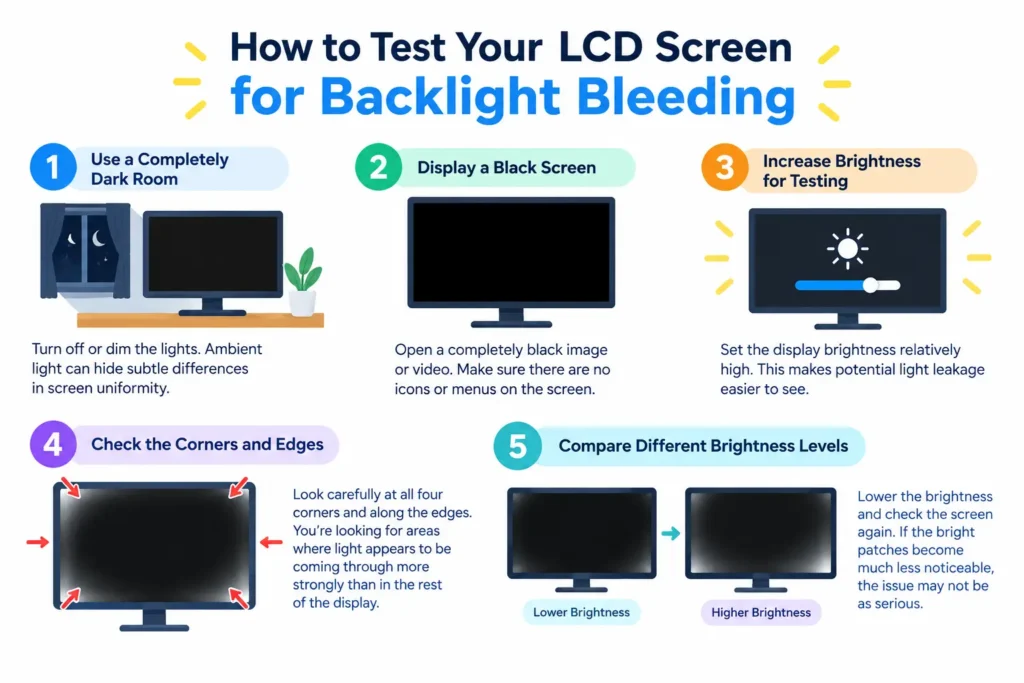
You don’t need specialized equipment to perform a basic backlight bleeding test.
1. Use a Completely Dark Room
Start by turning off or dimming the lights in the room.
Ambient light can hide subtle differences in screen uniformity, making bleeding harder to identify.
2. Display a Black Screen
Open a completely black image or video.
Make sure the display isn’t showing menus, icons, or other elements that could make the test harder to evaluate.
3. Increase Brightness for Testing
Set the display brightness relatively high temporarily.
This makes potential light leakage easier to see.
However, don’t assume that the amount of bleeding you see at maximum brightness represents your everyday viewing experience. Most people don’t use their displays at maximum brightness all the time.
4. Check the Corners and Edges
Look carefully at all four corners and along the edges.
You’re looking for areas where light appears to be coming through more strongly than in the rest of the display.
Take a photo if you want to compare the screen later, but remember that smartphone cameras can exaggerate brightness differences depending on exposure settings.
5. Compare Different Brightness Levels
Lower the brightness and check the screen again.
If the bright patches become much less noticeable, adjusting your normal brightness may be enough to make the issue practically irrelevant.
LCD Backlight Bleeding vs Other Display Problems
Backlight bleeding is often confused with other types of display imperfections. Identifying the difference matters because the underlying causes and solutions aren’t necessarily the same.
| Display issue | What it looks like | Common characteristic |
| Backlight bleeding | Bright areas around edges or corners | Usually fixed in specific locations |
| IPS glow | Glow that changes with viewing angle | More noticeable from certain positions |
| Dead pixels | Permanently black pixels | Individual pixels don’t light up |
| Stuck pixels | Permanently colored pixels | Individual pixels remain red, green, blue, etc. |
| Clouding | Large uneven bright areas | Uneven backlight across broader sections |
Backlight Bleeding vs IPS Glow
This is one of the most common sources of confusion.
Backlight bleeding generally stays in the same physical location, such as a particular corner or edge.
IPS glow, on the other hand, is associated with IPS panel technology and can change significantly when you move your viewing position.
If a bright area changes or disappears when you move your head, it may be IPS glow rather than backlight bleeding.
That’s important because IPS glow isn’t necessarily a manufacturing defect.
How to Fix LCD Screen Bleeding
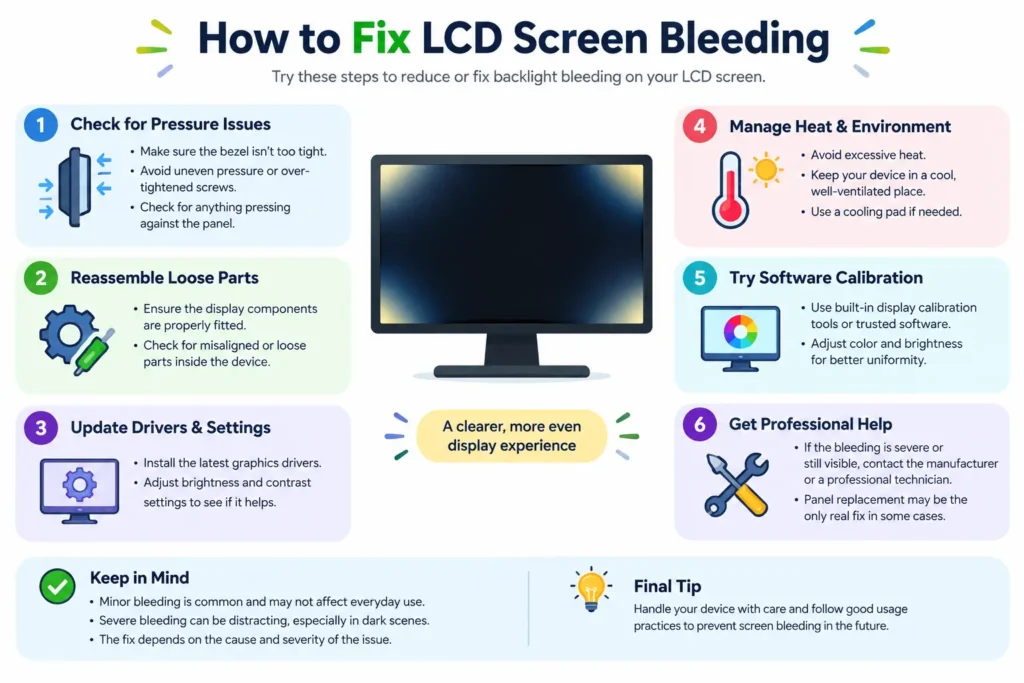
The right solution depends on the severity and cause of the problem.
In some cases, you can make bleeding less noticeable with simple adjustments. In others, the issue is related to the physical panel and may require replacement.
Reduce the Screen Brightness
The simplest thing to try is lowering your display brightness.
Higher brightness makes backlight imperfections easier to see. Reducing it to a comfortable level can significantly reduce how noticeable the problem is.
This doesn’t physically repair the panel, but it can make mild bleeding much less distracting.
Check and Adjust the Display Settings
Try adjusting settings such as:
- Brightness
- Contrast
- Backlight level
- Picture mode
- Local dimming, where available
Different picture modes can change how noticeable uneven illumination appears.
Don’t rely on extreme settings just to hide the problem, though. The goal is to find a comfortable configuration for normal use.
Loosen Overly Tight Bezel or Mounting Pressure
If screen bleeding appeared after mounting, installation, or repair, excessive pressure around the panel could potentially be contributing to it.
In some displays, reducing unnecessary pressure around the bezel may help.
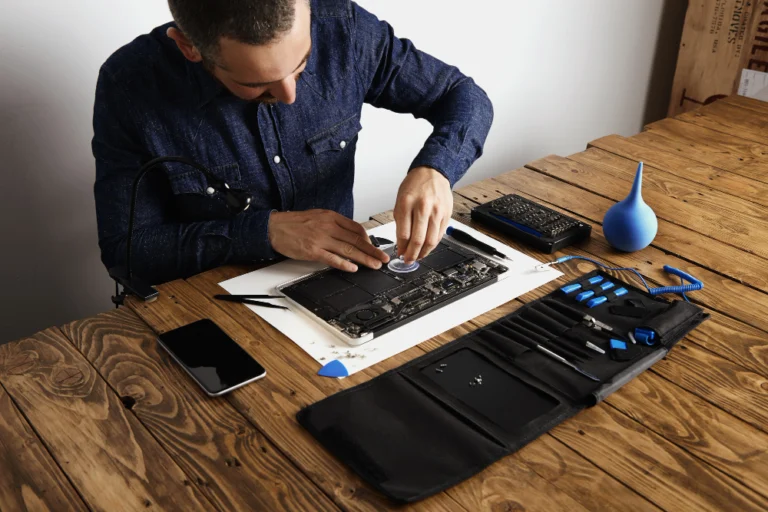
However, this isn’t a good DIY project for everyone. LCD panels are fragile, and attempting to disassemble a monitor or laptop can cause more damage.
Gently Reposition the Display Components
Some repair guides recommend applying pressure to areas of the panel to redistribute pressure.
This approach is risky.
An LCD panel contains delicate layers, and excessive pressure can permanently damage pixels or the panel itself. Avoid squeezing, pressing, twisting, or manipulating the screen aggressively.
If the display is new, returning or replacing it is usually a safer approach than attempting a physical repair.
Consider Professional Screen Repair
If the issue is caused by a physical assembly problem, a qualified technician may be able to determine whether the panel or mounting components are responsible.
Professional repair makes more sense for expensive displays or devices that are otherwise in good condition.
Replace the LCD Panel When Necessary
If the bleeding is severe and remains distracting after reasonable adjustments, replacing the panel may be the most practical solution.
For a relatively inexpensive monitor, buying a replacement can sometimes make more financial sense than paying for a panel repair.
🎯 More Helpful Guides: How to Fix a TV Remote That’s Not Working (2026 Guide)
Can You Fix Screen Bleeding Permanently?
Sometimes, but it depends on the cause.
If the problem is primarily related to brightness or display settings, changing those settings can effectively eliminate the issue during normal use.
If the bleeding results from physical characteristics of the LCD panel, software settings can’t actually repair it.
A replacement may be the only way to eliminate severe bleeding.
It’s also worth remembering that LCD panels can have some degree of backlight variation. The goal isn’t necessarily to make every panel perfectly uniform under extreme test conditions. What matters is whether the display performs acceptably during normal use.
How to Prevent LCD Screen Bleeding
You can’t completely eliminate the possibility of backlight bleeding, but careful handling can reduce the risk of creating or worsening display problems.
Handle Screens Carefully
Avoid pressing directly against an LCD panel.
When transporting a laptop, monitor, or other display, protect it from impacts and pressure.
Avoid Excessive Pressure on the Panel
Don’t place heavy objects on top of a laptop or squeeze a monitor between tightly packed items.
Even without visible cracks, excessive pressure can affect the internal layers of an LCD panel.
Protect Displays During Transport
Use suitable packaging when moving a monitor or television.
If you’re shipping a display, the original packaging is generally preferable because it is designed to protect the device during transportation.
Keep Devices Within Recommended Temperature Ranges
Avoid exposing LCD devices to excessive heat for prolonged periods.
Don’t block ventilation on monitors, laptops, or other devices that generate heat.
Avoid Overtightening Mounting Hardware
When installing a monitor or display, follow the manufacturer’s mounting instructions.
If screws or brackets apply excessive pressure to the display assembly, they may contribute to unevenness or other physical problems.
Check Panel Quality Before Buying
If display uniformity is important to you, research the specific monitor or display model before purchasing.
Look for reviews that discuss:
- Black uniformity
- Backlight bleed
- IPS glow
- Panel consistency
- Quality control
- Warranty and return policies
Keep in mind that reviews describe individual units, so one person’s experience doesn’t guarantee that every unit will behave identically.
🎯 More Helpful Guides: Computer Screen Shadow Problem: Causes and Fixes
Should You Return or Replace a Screen With Bleeding?
That depends on how severe the problem is and how it affects your normal use.
If you can only see the bleeding on a completely black test screen with the lights off, it may not be worth replacing an otherwise good display.
But if bright patches are clearly visible during movies, games, photo editing, or everyday work, you may want to consider a replacement.
Before returning the display, check:
- The manufacturer’s return policy.
- The warranty terms.
- Whether the manufacturer defines acceptable backlight variation.
- Whether the issue is actually backlight bleeding or IPS glow.
- Whether the problem remains noticeable at your normal brightness level.
If the product is new and the bleeding is severe, contacting the retailer first is often simpler than attempting a DIY repair.
Frequently Asked Questions About LCD Screen Bleeding
Is LCD screen bleeding normal?
Some degree of backlight variation can occur with LCD displays. Whether it is considered normal depends on the panel, manufacturer specifications, and how noticeable the issue is during ordinary use.
Does screen bleeding get worse over time?
It can change over time, but not every case becomes worse. Physical stress, heat, aging components, and changes in the panel assembly can affect display uniformity.
Can screen bleeding disappear on its own?
Minor changes may occur, but you shouldn’t rely on screen bleeding disappearing by itself. If the problem is caused by the physical construction of the panel, it generally won’t be permanently corrected without addressing the underlying issue.
Does lowering brightness reduce screen bleeding?
Yes. Lowering brightness can make backlight bleeding considerably less noticeable because the backlight isn’t operating at such a high intensity.
However, it doesn’t physically repair the panel.
Is backlight bleeding covered under warranty?
It depends on the manufacturer’s warranty and quality-control standards.
Some manufacturers may consider minor backlight variation normal, while others may replace a panel when the issue exceeds their acceptable threshold.
Check the warranty terms for your specific device.
Can screen bleeding be fixed without replacing the screen?
Sometimes you can reduce its visibility by lowering brightness or changing display settings.
If the underlying problem is a physical defect in the panel, however, settings won’t permanently fix it.
What is the difference between IPS glow and backlight bleeding?
Backlight bleeding typically appears as fixed bright areas around the edges or corners of the display.
IPS glow tends to change depending on your viewing angle and position. It’s a characteristic associated with IPS displays rather than necessarily being a physical defect.
🎯 More Helpful Guides: How are anime desk setups becoming a major trend among fans?
Final Thoughts on LCD Screen Bleeding
LCD screen bleeding occurs when a display’s backlight isn’t distributed perfectly, and light becomes visible around areas such as the edges and corners.
It can be caused by panel construction, uneven pressure, manufacturing variation, physical damage, or other assembly-related factors.
Before trying to fix the problem, make sure you’re actually dealing with backlight bleeding rather than IPS glow, dead pixels, or another display issue. Then test the screen under realistic conditions instead of judging it solely from an extreme black-screen test.
For mild cases, lowering brightness and adjusting display settings may be all you need. Severe or distracting bleeding, especially on a new display, may make a return, warranty claim, or panel replacement more practical than attempting a risky DIY repair.
The best prevention is straightforward: handle LCD panels carefully, avoid unnecessary pressure, protect them during transport, and choose displays with good panel-quality reviews and reasonable return policies.
✨ If this helped, imagine what’s coming next. Follow Tech Statar.