
Your AI-Built App Demo Isn’t a Product Yet: The Gap Between a Prototype and Something Real Users Can Break
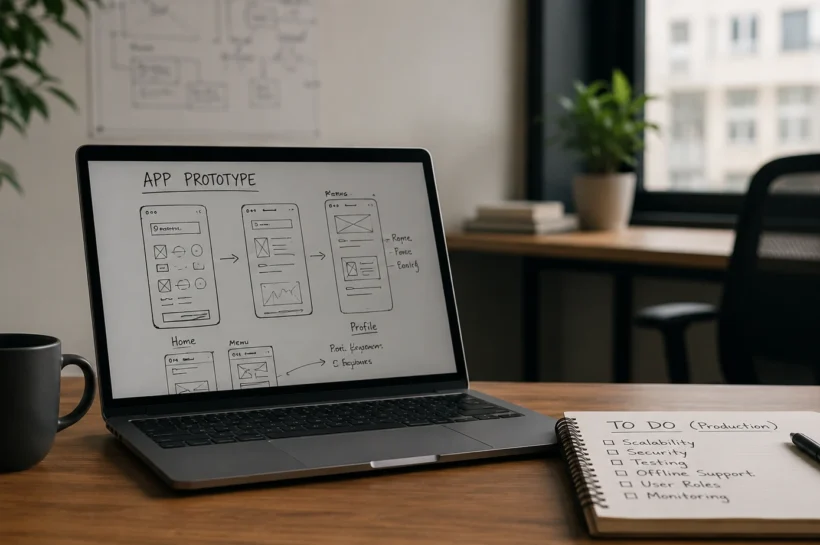
Last quarter, a founder demoed a mobile app he had put together over a weekend. He tapped through six screens, pulled in live-looking data, and showed a little assistant that answered questions about an order. Eight weeks later, that same app buckled the first time forty people opened it at once. Nothing in the demo had hinted at the problem, because the demo was never built to be used. It was built to be watched.
A lot of teams are stuck in this spot. AI coding tools have made it easy to produce something that looks like a shipped app: clean screens, smooth navigation, sample calls that return tidy responses. The result is convincing enough that stakeholders start calling it version one. It isn’t. It is a sketch with good lighting, and the distance between that sketch and a product people can lean on is where most of the real work lives.
Now your app acts on the user’s behalf, and a demo can’t fake that
The timing makes this worse. Gartner expects 40 percent of enterprise apps to carry task-specific AI agents by the end of 2026, up from under 5 percent a year earlier. McKinsey’s 2025 survey found that nearly every company is spending AI, while only about 1 percent believe they have reached any real maturity with it. So we have a wave of apps that now do things on the user’s behalf, built by teams who are still learning how to make ordinary apps hold up.
Picture that order assistant from the weekend demo, now live. A customer asks it to cancel an order and reorder a different size. In the demo, it printed a friendly confirmation. In a production environment, it must verify inventory, process payment reversals, update the order system, and halt immediately whenever there is uncertainty rather than risk making an incorrect decision. An agent that books, cancels, pays, or files something inside a live workflow is not a feature you bolt on. It needs traceable decisions, controlled access to data, and a path for a human to take over when the automation guesses wrong. A prototype skips all of that and still looks great on stage.
The four failures that only show up under real traffic
Apps rarely fail at scale because a screen needs polish. They fail underneath. A few patterns show up again and again once real traffic arrives.
The backend was never designed for mobile load. A phone app can fire far more requests per second than the web front end the backend was built to serve, and the database that felt instant with test data starts queuing under a few hundred concurrent sessions.
Authentication holds for one user and cracks across many. The demo logged in as one person. Production has admins, read-only viewers, suspended accounts, and people who switch devices mid-session, and the token logic written for a single happy path does not cover any of them.
There is no offline story. The prototype assumed a perfect connection. Real users ride elevators, lose signal in warehouses, and still expect the app to remember what they did. Offline behavior is an architecture decision, not a setting you flip later.
And nobody can explain user behavior. The demo had no analytics worth the name, so when something goes wrong in the field, the team is guessing instead of reading. None of these are visual problems, which is exactly why a good-looking prototype hides them so well.
💚 You might also like: What Is GEO? How AI Search Is Changing Online Discovery
The prototype proved the idea; production asks the harder questions
The useful way to think about an AI-built demo is as a discovery asset. It is excellent for testing whether an idea is worth pursuing, comparing two interaction models, or showing a stakeholder what you mean instead of describing it. Used that way, the speed is a gift. The mistake is letting the prototype become the foundation everyone builds on, because then every shortcut it took quietly turns into a load-bearing decision.
Production starts from different questions. How many people will use this at peak, and what happens to the database then? What user roles are available, and what level of access does each role provide? What does the app do with no signal? Where does data live, how is it encrypted on the device and in transit, and who is allowed to see it? If an AI action fails, who finds out, and how do they step in? Answer those first, and the screens almost design themselves. Answer them last, and you rebuild.
This is the point where teams that have proven their idea hand the production build to people who do it for a living. Good custom mobile application development services don’t start by reskinning the prototype. They start by mapping the load, the roles, the offline cases, and the integration points the demo waved past, then build the version that survives contact with actual users.
Finding the gap after launch is the expensive way to find it
The framing that gets teams into trouble is thinking of the production app as a bigger version of the prototype. It is a different kind of work. The prototype answers, “Could this exist?” The product answers, “Will this stand up on a Monday morning when half the sales team logs in from the road?” That second question is the whole job, and it is why the build is better handled as software product engineering solutions with real attention to architecture, testing, security, and the messy systems the app has to plug into, rather than as a quick second pass over a weekend’s output.
There is a reason to care about this beyond engineering pride. Finding the gap in production is the most expensive way to find it. The backend rewrite, the auth redesign, the offline retrofit: each one costs far more after launch than it would have as a decision made before the first line of production code. Most a software product’s lifetime cost lands after the build, in the years of fixing and extending that follow, and a prototype that sets bad defaults is borrowing against that future at a punishing rate.
None of this is an argument against AI in the workflow. Use it. Let it draft, let it test ideas, and carry the boring parts. Just be honest about what you are holding when the demo ends. A prototype that wows a room has done its job. Asking it to also carry your customers is how you end up with forty people and a crash you never saw coming.
The cheapest time to find the gap is before you ship. The most expensive is after, in production, with users watching.
Conclusion
AI has dramatically shortened the path from idea to prototype, making it easier than ever to turn concepts into working demos. But a convincing demo is not the same as a reliable product. The moment an app begins handling real users, real data, and real business processes, the challenges shift from design and functionality to scalability, security, performance, and long-term maintainability. A prototype proves that an idea is possible; a production-ready application proves that it can be trusted.
The teams that succeed are the ones that recognize this distinction early. Instead of treating a prototype as a finished product, they use it as a starting point for building the architecture, safeguards, and operational foundations that real-world software demands. In the end, the goal is not to create an app that looks impressive during a demo. It is to build one that continues working when users depend on it every day.
✨ Don’t stop here, follow Tech Statar for daily upgrades.